
GitHub Actions 快速使用
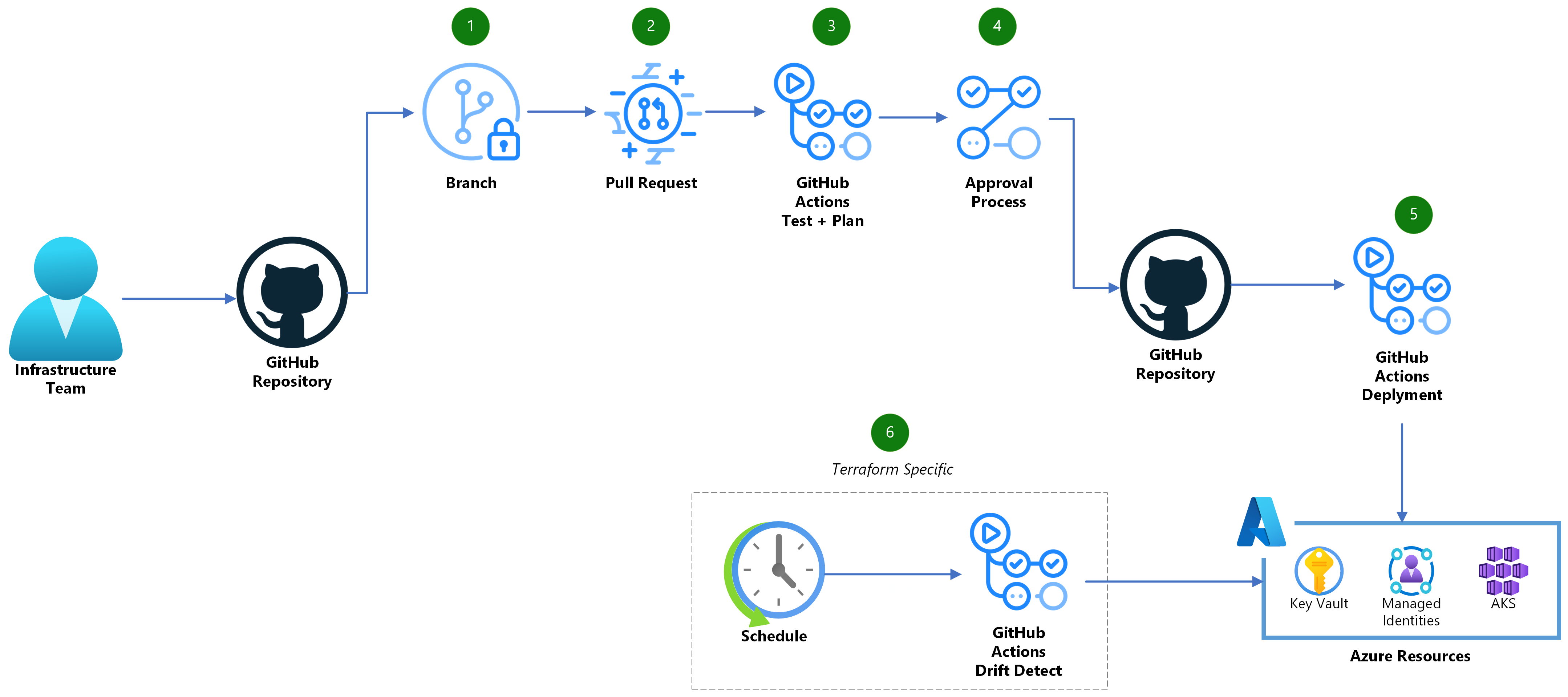
随着自动化和持续集成在开发中的普及,GitHub Actions 已成为开发者提升效率、自动化工作流的强大工具。本文将以简洁实用的风格,带你快速了解并上手 GitHub Actions,适合初学者和希望快速实践的开发者。
一、什么是 GitHub Actions?
GitHub Actions 是 GitHub 提供的持续集成与持续交付(CI/CD)平台。通过编写简单的配置文件,你可以在代码推送、拉取请求等事件发生时自动执行测试、构建、部署等任务。其核心思想是将自动化流程拆分为可复用的“动作”(actions),并通过“工作流”(workflow)进行编排。
二、核心概念
- Workflow(工作流):自动化流程的整体定义,由一个或多个任务组成。
- Job(作业):工作流中的单个任务,可以并行或串行执行。
- Step(步骤):作业中的具体操作,每一步可以运行命令或调用 action。
- Action(动作):可复用的自动化脚本,GitHub 提供了丰富的官方和社区 actions。
三、快速开始
1. 创建工作流文件
在你的仓库下新建 .github/workflows 目录,并创建一个 github-actions-demo.yml 文件。工作流文件采用 YAML 格式,后缀为 .yml 或 .yaml。
  yamlname: GitHub Actions Demo
run-name: ${{ github.actor }} is testing out GitHub Actions 🚀
on: [push]
jobs:
  Explore-GitHub-Actions:
    runs-on: ubuntu-latest
    steps:
      - run: echo "🎉 The job was automatically triggered by a ${{ github.event_name }} event."
      - run: echo "🐧 This job is now running on a ${{ runner.os }} server hosted by GitHub!"
      - run: echo "🔎 The name of your branch is ${{ github.ref }} and your repository is ${{ github.repository }}."
      - name: Check out repository code
        uses: actions/checkout@v4
      - run: echo "💡 The ${{ github.repository }} repository has been cloned to the runner."
      - run: echo "🖥️ The workflow is now ready to test your code on the runner."
      - name: List files in the repository
        run: |
          ls ${{ github.workspace }}
      - run: echo "🍏 This job's status is ${{ job.status }}."
2. 提交并触发工作流
将该文件提交到仓库主分支(如 main 或 master)。每次 push 事件都会自动触发该工作流。
3. 查看运行结果
在 GitHub 仓库页面,点击顶部的 “Actions” 标签页,可以看到工作流的触发记录和每一步的详细日志,方便排查和优化。
四、进阶用法
1. 使用 Actions 市场
你可以在 GitHub Actions Marketplace 搜索和集成丰富的官方及社区 actions,例如自动部署、发送通知、代码检查等。
引用 action 示例:
  yaml- name: Checkout code
  uses: actions/checkout@v4

- name: Setup Node.js
  uses: actions/setup-node@v4
  with:
    node-version: '18'
2. 定制触发条件
可以通过 on 字段指定更细致的触发条件,比如只在 main 分支 push 时触发:
  yamlon:
  push:
    branches:
      - main
3. 多 Job 串并行与依赖
通过 needs 字段设置作业依赖,灵活控制执行顺序:
  yamljobs:
  build:
    runs-on: ubuntu-latest
    steps:
      # build steps
  test:
    runs-on: ubuntu-latest
    needs: build
    steps:
      # test steps
五、实战详解:Rust 项目自动化测试与发布工作流
下面我们以一个 Rust 项目的 Release 工作流为例,详细解析每个部分的作用和配置,帮助你理解如何用 GitHub Actions 实现自动测试、构建和发布流程。
1. 工作流触发与权限
  yamlname: Release

on:
  push:
    tags:
      - 'v*'

permissions:
contents: write- name:工作流名称,显示在 Actions 页面。
- on.push.tags:当推送以
v开头的标签(如v1.0.0)时触发,适合版本发布场景。 - permissions.contents: write:赋予 workflow 写入仓库内容的权限,便于自动创建 Release。
2. 测试任务(test)
  yamljobs:
  test:
    name: 测试 (${{ matrix.os }})
    runs-on: ${{ matrix.os }}
    strategy:
      matrix:
        os: [ubuntu-latest, windows-latest, macos-latest]
    steps:
      - name: 检出代码
        uses: actions/checkout@v4

      - name: 设置Rust环境
        uses: actions-rs/toolchain@v1
        with:
          profile: minimal
          toolchain: stable
          override: true
          components: clippy, rustfmt

      - name: 缓存依赖
        uses: actions/cache@v4
        with:
          path: |
            ~/.cargo/registry
            ~/.cargo/git
            target
          key: ${{ runner.os }}-cargo-${{ hashFiles('**/Cargo.lock') }}
          restore-keys: |
            ${{ runner.os }}-cargo-

      - name: 检查代码格式
        uses: actions-rs/cargo@v1
        with:
          command: fmt
          args: --all -- --check

      - name: 运行 Clippy
        uses: actions-rs/cargo@v1
        with:
          command: clippy
          args: -- -D warnings

      - name: 运行测试
        uses: actions-rs/cargo@v1
        with:
command: test- matrix.os:指定在 Linux、Windows、macOS 三个平台并行测试。
- actions/checkout@v4:检出当前仓库源码。
- actions-rs/toolchain@v1:安装 Rust 稳定版及相关工具(clippy、rustfmt)。
- actions/cache@v4:缓存 cargo 依赖和构建目录,加速后续流程。
- actions-rs/cargo@v1:依次检查代码格式、运行 Clippy 静态分析、执行测试。
3. 构建任务(build)
  yamlbuild:
    name: Build Release Binary (${{ matrix.os }})
    needs: test
    runs-on: ${{ matrix.os }}
    strategy:
      matrix:
        include:
          - os: ubuntu-latest
            artifact_name: battery-limit
            asset_name: battery-limit-linux-amd64
          - os: windows-latest
            artifact_name: battery-limit.exe
            asset_name: battery-limit-windows-amd64.exe
          - os: macos-latest
            artifact_name: battery-limit
            asset_name: battery-limit-macos-amd64
    steps:
      - name: 检出代码
        uses: actions/checkout@v4

      - name: 设置Rust环境
        uses: actions-rs/toolchain@v1
        with:
          profile: minimal
          toolchain: stable
          override: true

      - name: 缓存依赖
        uses: actions/cache@v4
        with:
          path: |
            ~/.cargo/registry
            ~/.cargo/git
            target
          key: ${{ runner.os }}-cargo-${{ hashFiles('**/Cargo.lock') }}
          restore-keys: |
            ${{ runner.os }}-cargo-

      - name: 构建项目 (Release模式)
        uses: actions-rs/cargo@v1
        with:
          command: build
          args: --release

      - name: 重命名二进制文件 (Linux/macOS)
        if: matrix.os != 'windows-latest'
        run: cp target/release/battery-limit ${{ matrix.asset_name }}

      - name: 重命名二进制文件 (Windows)
        if: matrix.os == 'windows-latest'
        run: copy target\release\battery-limit.exe ${{ matrix.asset_name }}

      - name: 上传构建产物
        uses: actions/upload-artifact@v4
        with:
          name: ${{ matrix.asset_name }}
path: ${{ matrix.asset_name }}- needs: test:依赖 test 任务,测试通过后才会构建。
- matrix.include:为每个平台指定产物名和文件名,便于后续上传。
- actions/checkout@v4、actions-rs/toolchain@v1、actions/cache@v4:同测试任务。
- actions-rs/cargo@v1 build –release:编译 Release 版本。
- 重命名产物:根据平台区分命名,方便区分不同系统的二进制文件。
- actions/upload-artifact@v4:上传构建产物,供后续 job 使用。
4. 创建发布任务(create-release)
  yamlcreate-release:
    name: 创建发布
    needs: build
    runs-on: ubuntu-latest
    permissions:
      contents: write

    steps:
      - name: 检出代码
        uses: actions/checkout@v4
        with:
          fetch-depth: 0

      - name: 获取标签版本
        id: get_version
        run: echo "VERSION=${GITHUB_REF#refs/tags/}" >> $GITHUB_OUTPUT

      - name: 生成变更日志
        id: changelog
        run: |
          LATEST_TAG=$(git describe --tags --abbrev=0 HEAD^ 2>/dev/null || echo "")
          if [ -z "$LATEST_TAG" ]; then
            git log --pretty=format:"- %s" > CHANGELOG.md
          else
            git log --pretty=format:"- %s" $LATEST_TAG..HEAD > CHANGELOG.md
          fi
          echo "CHANGELOG_FILE=CHANGELOG.md" >> $GITHUB_OUTPUT

      - name: 创建Release
        id: create_release
        uses: softprops/action-gh-release@v1
        env:
          GITHUB_TOKEN: ${{ secrets.PAT }}
        with:
          tag_name: ${{ steps.get_version.outputs.VERSION }}
          name: Battery Limit ${{ steps.get_version.outputs.VERSION }}
          body_path: ${{ steps.changelog.outputs.CHANGELOG_FILE }}
          draft: false
          prerelease: false

      - name: 下载所有构建产物
        uses: actions/download-artifact@v4

      - name: 上传Release资源
        uses: softprops/action-gh-release@v1
        env:
          GITHUB_TOKEN: ${{ secrets.PAT }}
        with:
          tag_name: ${{ steps.get_version.outputs.VERSION }}
          files: |
            battery-limit-linux-amd64/battery-limit-linux-amd64
            battery-limit-windows-amd64.exe/battery-limit-windows-amd64.exe
battery-limit-macos-amd64/battery-limit-macos-amd64- needs: build:依赖所有平台的构建任务。
- actions/checkout@v4 with fetch-depth: 0:拉取完整历史,便于生成变更日志。
- 获取标签版本:提取当前触发 workflow 的标签(如 v1.2.3)。
- 生成变更日志:通过 git log 自动生成自上一个标签以来的提交列表,写入 CHANGELOG.md。
- softprops/action-gh-release@v1:创建 GitHub Release,自动填写版本名和变更日志,并上传产物。
- actions/download-artifact@v4:下载所有平台的构建产物,准备上传到 Release。
- 再次调用 softprops/action-gh-release@v1:将产物文件作为 Release 附件上传。
5. 工作流亮点与最佳实践
- 全自动流程:从测试、构建到发布 Release 全流程自动化,无需人工干预。
- 跨平台支持:一套配置同时支持 Linux、Windows、macOS,适合多平台分发。
- 依赖缓存:显著加快 CI/CD 速度。
- 自动生成变更日志:提升发布规范性和可追溯性。
- 权限与安全:最小化权限声明,敏感操作使用 Secrets 管理。
6. 完整工作流
  yamlname: Release

on:
  push:
    tags:
      - 'v*'

# 添加权限声明
permissions:
  contents: write

jobs:
  test:
    name: 测试 (${{ matrix.os }})
    runs-on: ${{ matrix.os }}
    strategy:
      matrix:
        os: [ubuntu-latest, windows-latest, macos-latest]

    steps:
      - name: 检出代码
        uses: actions/checkout@v4

      - name: 设置Rust环境
        uses: actions-rs/toolchain@v1
        with:
          profile: minimal
          toolchain: stable
          override: true
          components: clippy, rustfmt

      - name: 缓存依赖
        uses: actions/cache@v4
        with:
          path: |
            ~/.cargo/registry
            ~/.cargo/git
            target
          key: ${{ runner.os }}-cargo-${{ hashFiles('**/Cargo.lock') }}
          restore-keys: |
            ${{ runner.os }}-cargo-

      - name: 检查代码格式
        uses: actions-rs/cargo@v1
        with:
          command: fmt
          args: --all -- --check

      - name: 运行 Clippy
        uses: actions-rs/cargo@v1
        with:
          command: clippy
          args: -- -D warnings

      - name: 运行测试
        uses: actions-rs/cargo@v1
        with:
          command: test

  build:
    name: Build Release Binary (${{ matrix.os }})
    needs: test # 添加依赖,构建任务只有在测试任务成功后才会运行
    runs-on: ${{ matrix.os }}
    strategy:
      matrix:
        include:
          - os: ubuntu-latest
            artifact_name: battery-limit
            asset_name: battery-limit-linux-amd64
          - os: windows-latest
            artifact_name: battery-limit.exe
            asset_name: battery-limit-windows-amd64.exe
          - os: macos-latest
            artifact_name: battery-limit
            asset_name: battery-limit-macos-amd64

    steps:
      - name: 检出代码
        uses: actions/checkout@v4

      - name: 设置Rust环境
        uses: actions-rs/toolchain@v1
        with:
          profile: minimal
          toolchain: stable
          override: true

      - name: 缓存依赖
        uses: actions/cache@v4
        with:
          path: |
            ~/.cargo/registry
            ~/.cargo/git
            target
          key: ${{ runner.os }}-cargo-${{ hashFiles('**/Cargo.lock') }}
          restore-keys: |
            ${{ runner.os }}-cargo-

      - name: 构建项目 (Release模式)
        uses: actions-rs/cargo@v1
        with:
          command: build
          args: --release

      - name: 重命名二进制文件 (Linux/macOS)
        if: matrix.os != 'windows-latest'
        run: cp target/release/battery-limit ${{ matrix.asset_name }}

      - name: 重命名二进制文件 (Windows)
        if: matrix.os == 'windows-latest'
        run: copy target\release\battery-limit.exe ${{ matrix.asset_name }}

      - name: 上传构建产物
        uses: actions/upload-artifact@v4
        with:
          name: ${{ matrix.asset_name }}
          path: ${{ matrix.asset_name }}

  create-release:
    name: 创建发布
    needs: build
    runs-on: ubuntu-latest
    permissions:
      contents: write

    steps:
      - name: 检出代码
        uses: actions/checkout@v4
        with:
          fetch-depth: 0

      - name: 获取标签版本
        id: get_version
        run: echo "VERSION=${GITHUB_REF#refs/tags/}" >> $GITHUB_OUTPUT

      - name: 生成变更日志
        id: changelog
        run: |
          LATEST_TAG=$(git describe --tags --abbrev=0 HEAD^ 2>/dev/null || echo "")

          if [ -z "$LATEST_TAG" ]; then
            # 如果没有先前的标签,则获取所有提交
            git log --pretty=format:"- %s" > CHANGELOG.md
          else
            # 否则只获取最新标签之后的提交
            git log --pretty=format:"- %s" $LATEST_TAG..HEAD > CHANGELOG.md
          fi

          echo "CHANGELOG_FILE=CHANGELOG.md" >> $GITHUB_OUTPUT

      - name: 创建Release
        id: create_release
        uses: softprops/action-gh-release@v1
        env:
          GITHUB_TOKEN: ${{ secrets.PAT }}
        with:
          tag_name: ${{ steps.get_version.outputs.VERSION }}
          name: Battery Limit ${{ steps.get_version.outputs.VERSION }}
          body_path: ${{ steps.changelog.outputs.CHANGELOG_FILE }}
          draft: false
          prerelease: false

      - name: 下载所有构建产物
        uses: actions/download-artifact@v4

      - name: 上传Release资源
        uses: softprops/action-gh-release@v1
        env:
          GITHUB_TOKEN: ${{ secrets.PAT }}
        with:
          tag_name: ${{ steps.get_version.outputs.VERSION }}
          files: |
            battery-limit-linux-amd64/battery-limit-linux-amd64
            battery-limit-windows-amd64.exe/battery-limit-windows-amd64.exe
            battery-limit-macos-amd64/battery-limit-macos-amd64
六、常见问题与资源
- 官方文档:GitHub Actions 官方文档
- 工作流模板:actions/starter-workflows 仓库
- 社区精选:awesome-actions
七、总结
GitHub Actions 让自动化变得简单而强大。通过合理设计 workflow,你可以极大提升开发效率,实现自动测试、构建、部署等多种场景。建议多尝试官方和社区的 actions,结合自身项目需求灵活配置,打造属于自己的自动化开发流程。